Test 1 IT – Creating a class for a robot
This test focuses on the design, implementation, and documentation of an object-oriented architecture around a main Robot class, which serves as the foundation for all robotic developments in the TEKBOT project.
1. Context
Robotics today plays a central role in technological innovation, combining computer science, electronics, and mechanics to design intelligent systems capable of interacting with their environment. This project is part of the Tekbot Robotics Challenge 2025 and constitutes the introductory challenge for the computer science part of the competition.
It involves designing and implementing an object-oriented architecture around a main Robot class, which will serve as the basis for all future robotic developments. The approach aims to introduce students to software modeling, code structuring, and thinking about software architecture in a robotic context.
The emphasis is on understanding the fundamental concepts of object-oriented programming and their concrete application in a technical project.
2. Objectives
The objectives are:
- Design a Robot class respecting the principles of object-oriented programming: encapsulation, inheritance, polymorphism
- Implement at least two specialized subclasses derived from the Robot class
- Redefine the
move()method in the subclasses to illustrate polymorphism - Ensure correct encapsulation of attributes (private attributes, getters/setters)
- Provide clear and compliant UML documentation
3. Project Structure
The TEKBOT project is organized according to a modular architecture faithful to the actual folder tree:
tekbot_classes/
├── __init__.py
├── action/
│   ├── __init__.py
│   ├── actionneur.py
│   ├── action_system.py
│   ├── bras_robotique.py
│   └── moteur.py
├── core/
│   ├── __init__.py
│   ├── position.py
│   ├── robot.py
│   └── robot_mobile.py
├── gestion_dechets/
│   ├── __init__.py
│   ├── dechet.py
│   └── gestionnaire_stockage.py
├── intelligence/
│   ├── __init__.py
│   ├── gestionnaire_energie.py
│   ├── ia.py
│   ├── intelligence_system.py
│   └── systeme_navigation.py
├── perception/
│   ├── __init__.py
│   ├── camera.py
│   ├── capteur.py
│   ├── gyroscope.py
│   ├── perception_system.py
│   └── temperature.py
└── ui/
    ├── __init__.py
    └── ihm.py
4. Object-Oriented Programming - Complete Implementation
The TEKBOT project illustrates the major principles of OOP through a modular and realistic architecture. Here is a pedagogical explanation of each concept, accompanied by concrete examples from the project's code.
4.0 THE CONSTRUCTOR – Object Initialization
Detailed Definition: The constructor is a special method of a class (in Python, __init__) that is called automatically when creating a new object. It allows initializing the object's attributes with starting values, ensuring that each instance starts in a coherent state.
Example in the project:
class Robot:
    def __init__(self, nom: str, energie: float = 100.0):
        self._nom = nom
        self._energie = energie
        self._etat = "prêt"
The __init__ constructor initializes the robot's name, energy, and state upon creation.
4.1 ENCAPSULATION – Protection and Control
Detailed Definition: Encapsulation is the principle of grouping data (attributes) and methods that manipulate this data within the same entity (the class). It protects the object's internal state by making certain attributes private (prefix _ or __), accessible only through public methods called accessors (getters) and mutators (setters). This allows controlling data modification and avoiding inconsistencies.
Example in the project:
class Capteur(ABC):
    def __init__(self, id_capteur: str, type_capteur: str):
        self._id = id_capteur.strip()      # Private attribute
        self._type = type_capteur.strip()  # Private attribute
        self._valeur = 0.0                 # Private attribute

    def get_valeur(self) -> float:
        return self._valeur

    def set_valeur(self, v: float):
        if v >= 0:
            self._valeur = v
        else:
            raise ValueError("Valeur invalide")
Here, the attributes are protected and access is done through dedicated methods, ensuring the consistency of values.
4.2 INHERITANCE – Reuse and Specialization
Detailed Definition: Inheritance allows creating a new class (called "child" or "derived") from an existing class (called "parent" or "base"). The child class inherits the attributes and methods of the parent class, which promotes code reuse and specialization. It can also redefine or extend certain behaviors.
Example in the project:
class Robot(ABC):
    # Abstract base class

class RobotMobile(Robot):
    def __init__(self, nom: str, vitesse: float):
        super().__init__(nom)  # Call parent constructor
        self._vitesse_max = float(vitesse)
The RobotMobile class inherits from Robot and adds specific functionalities related to mobility.
4.3 POLYMORPHISM – Flexibility and Extensibility
Detailed Definition: Polymorphism allows using the same interface (method or attribute) for objects of different types. Each subclass can redefine the inherited method to adapt its behavior. Thus, the same method call can produce different effects depending on the targeted object.
Example in the project:
class Capteur(ABC):
    @abstractmethod
    def lire_valeur(self):
        pass

class Camera(Capteur):
    def lire_valeur(self):
        # Specific to the camera
        pass

class Gyroscope(Capteur):
    def lire_valeur(self):
        # Specific to the gyroscope
        pass

# Polymorphic usage
capteurs = [Camera(...), Gyroscope(...)]
for capteur in capteurs:
    capteur.lire_valeur()  # Calls the method adapted to each type
The same method (lire_valeur) is called on each object, but the behavior depends on the concrete subclass.
4.4 ABSTRACTION – Simplification and Modularity
Detailed Definition: Abstraction consists of defining classes or methods without concrete implementation (abstract classes or methods). It imposes a contract on subclasses, which must provide their own implementation. This allows structuring the code and clarifying the responsibilities of each class.
Example in the project:
from abc import ABC, abstractmethod

class Robot(ABC):
    @abstractmethod
    def move(self):
        pass  # Must be redefined in subclasses
The Robot class imposes the presence of the move() method in its subclasses, without giving the details.
4.5 COMPOSITION & AGGREGATION – Building Complex Objects
Detailed Definition: Composition and aggregation are relationships that allow building complex objects from other objects. Composition implies that the composed object owns and manages the lifecycle of its components; aggregation indicates a more flexible relationship, where objects can exist independently.
Example in the project:
class ActionSystem:
    def __init__(self):
        self._actionneurs: Dict[str, Actionneur] = {}
        self._moteurs: List[Moteur] = []
        self._bras_robotiques: List[BrasRobotique] = []
The ActionSystem class is composed of Moteur, BrasRobotique, and Actionneur objects: it orchestrates their operation.
5. Technologies and Tools Used
5.1 Development Languages and Tools
- Python 3.11+ — Main language for object-oriented architecture and business logic
- Pygame 2.6+ — Interactive graphical simulation and robotic visualization
- VS Code — Modern and modular development environment
5.2 Architecture, Modeling and Organization
- PlantUML — UML diagram generation (classes, sequence, activities, use cases)
- Design Patterns — Singleton, Observer, Strategy, State for software robustness
- Modular Architecture — Clear separation of responsibilities in Python packages
6. Complete Collection of UML Diagrams
The UML modeling of the TEKBOT project relies on several types of diagrams, each with a specific objective in understanding and documenting the system.
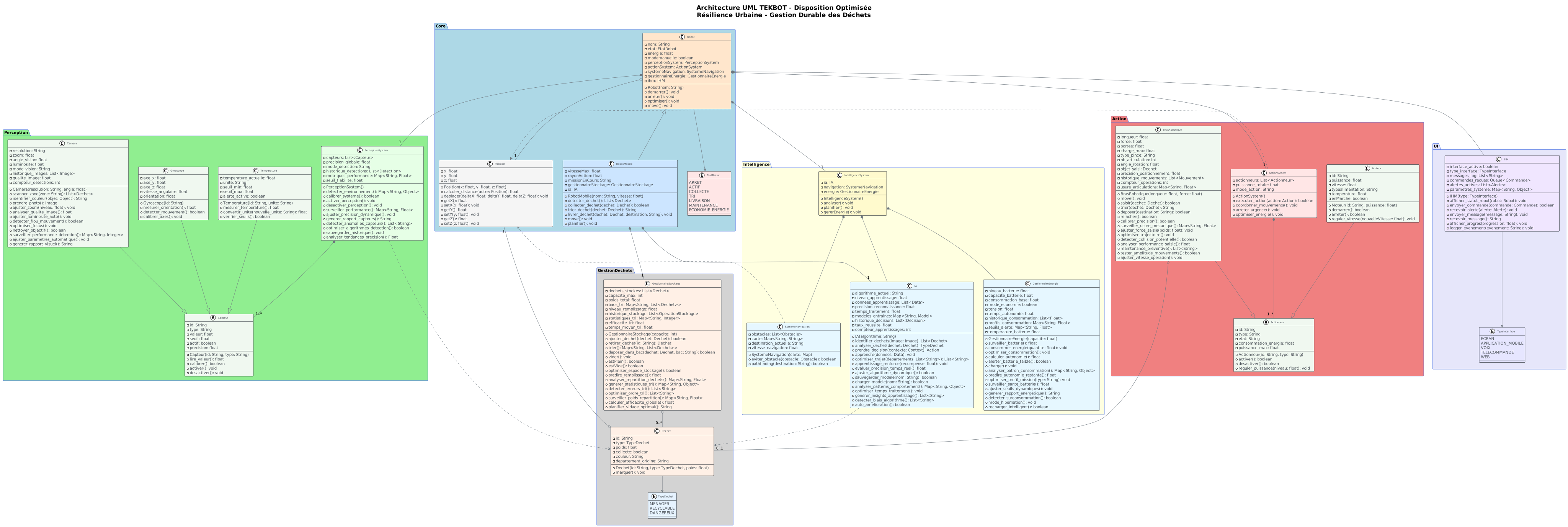
6.1 Main Class Diagram (with packages)
Definition: The UML class diagram represents the static structure of the system: it shows the classes, their attributes, methods, as well as the relationships (inheritance, composition, aggregation, associations) between them.
Objective: Provide an overview of the software architecture, facilitate understanding of interactions between modules, and guide code implementation.
💡 Click on the image to zoom • Use the back button or close the tab to return
Key points illustrated:
- Inheritance: Robot → RobotMobile, BrasRobotique
- Composition: Robot contains PerceptionSystem, ActionSystem
- Aggregation: Robot uses Navigation, GestionnaireStockage
- Polymorphism: Virtual methods redefined
- Encapsulation: Private attributes + public methods
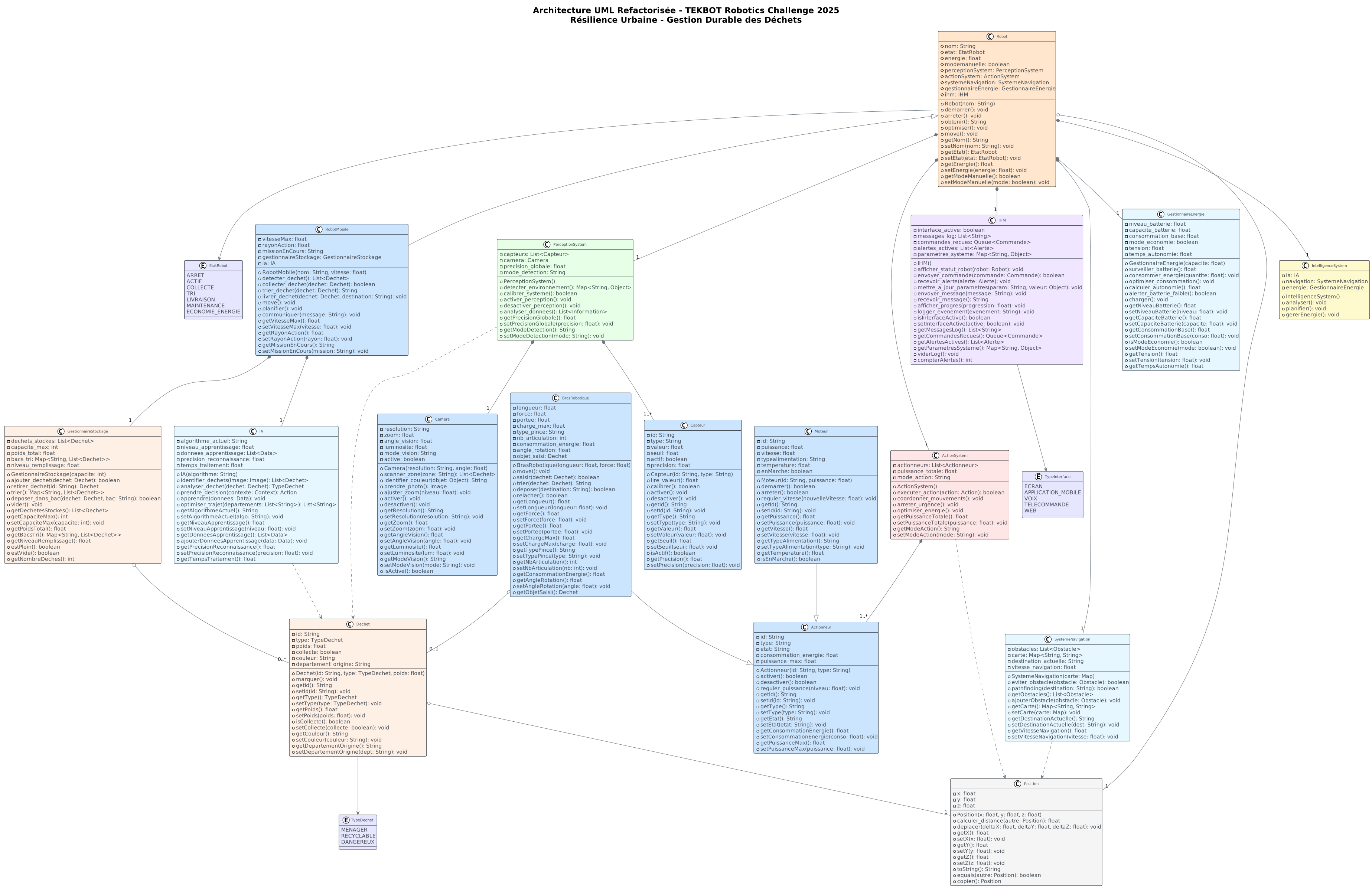
6.2 Class Diagram (without packages)
Definition: This simplified class diagram presents only the main classes and their relationships, without the package structure.
Objective: Allow a quick understanding of inheritance, composition, and aggregation relationships between the major classes of the project.
💡 Click on the image to zoom • Use the back button or close the tab to return
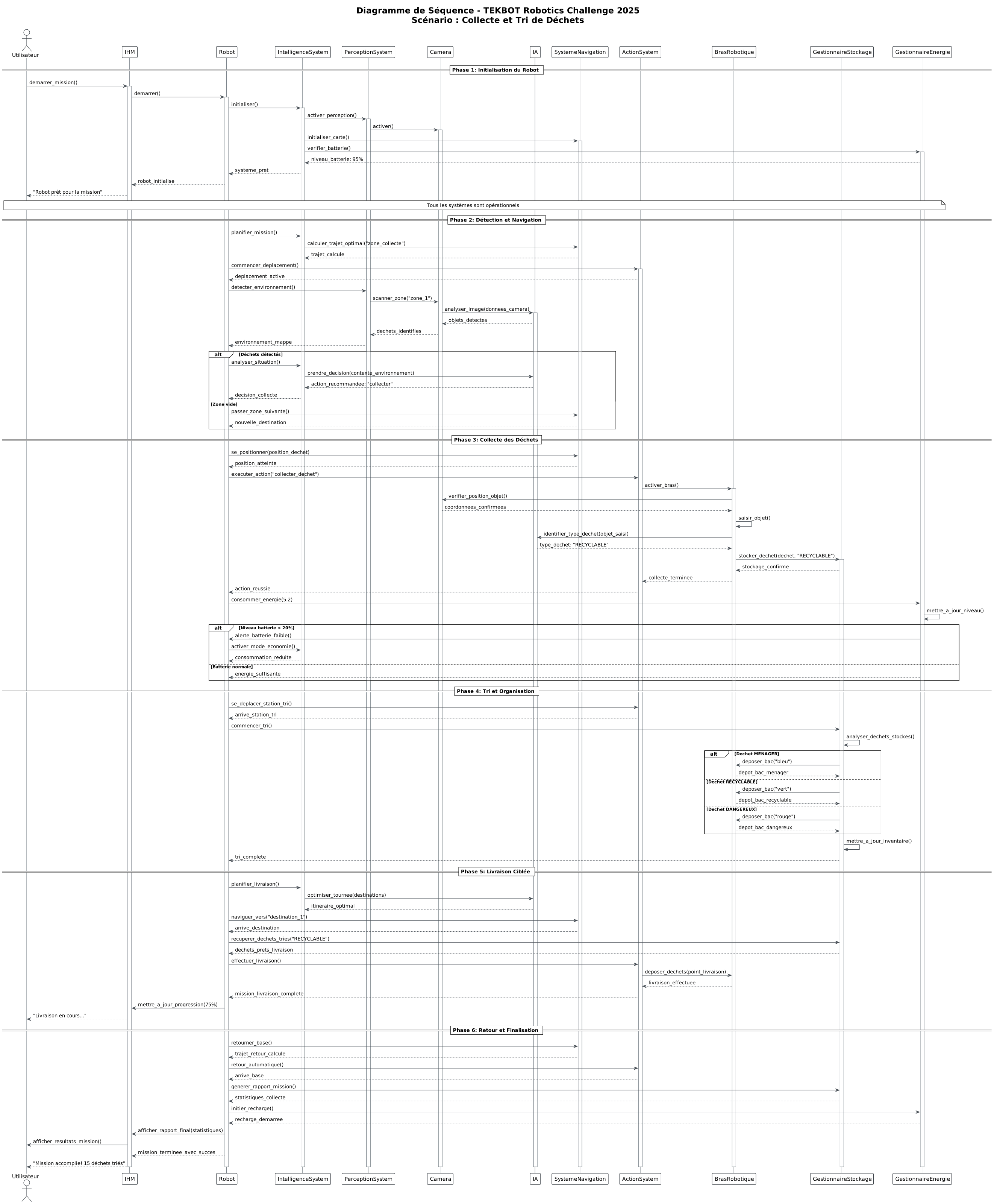
6.3 Sequence Diagram - Dynamic Interaction
Definition: The UML sequence diagram describes the temporal sequence of messages exchanged between objects during a specific scenario.
Objective: Illustrate the dynamic flow of a use case, clarify the execution logic, and detect potential synchronization or design problems.
💡 Click on the image to zoom • Use the back button or close the tab to return
Illustrated sequence:
The diagram presents the complete sequence of a collection mission: initialization of the robot and its systems, perception of the environment via sensors, AI analysis and decision-making, navigation towards the detected waste, collection via the robotic arm, then storage and automatic sorting.
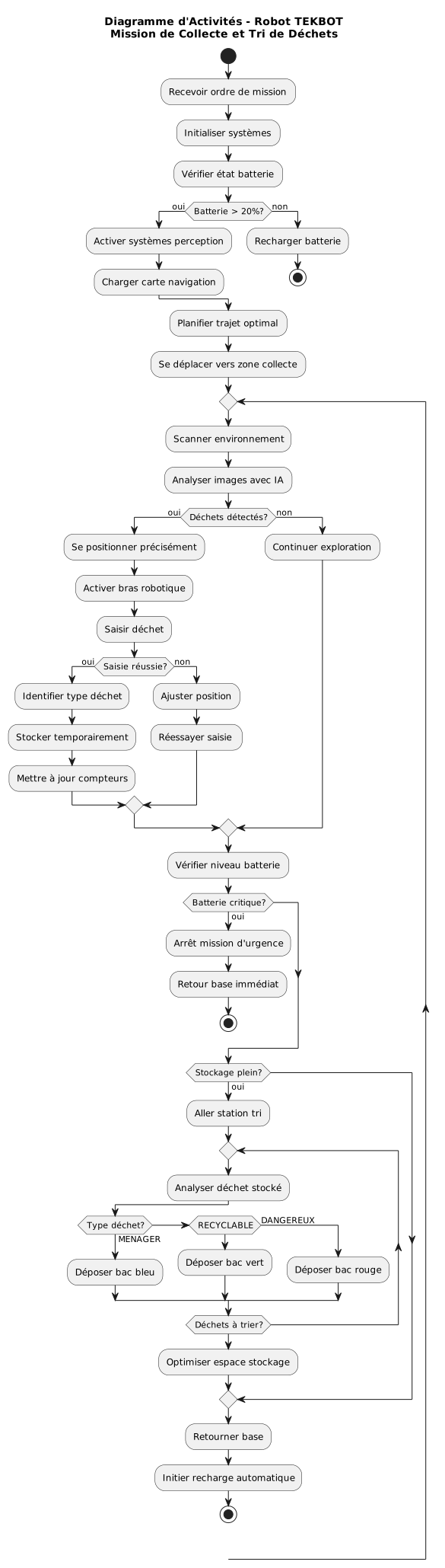
6.4 Activity Diagram - Processing Flow
Definition: The UML activity diagram models the control and data flows of a business process or algorithm.
Objective: Understand and optimize processes, identify decision points and alternatives, and document complex scenarios.
💡 Click on the image to zoom • Use the back button or close the tab to return
This diagram illustrates the complete flow of a TEKBOT mission: startup, exploration, energy management, prioritized collection, and stop conditions. The conditional branches and processing loops allow anticipating particular cases and optimizing processes before implementation.
6.5 Use Case Diagram - User Interactions
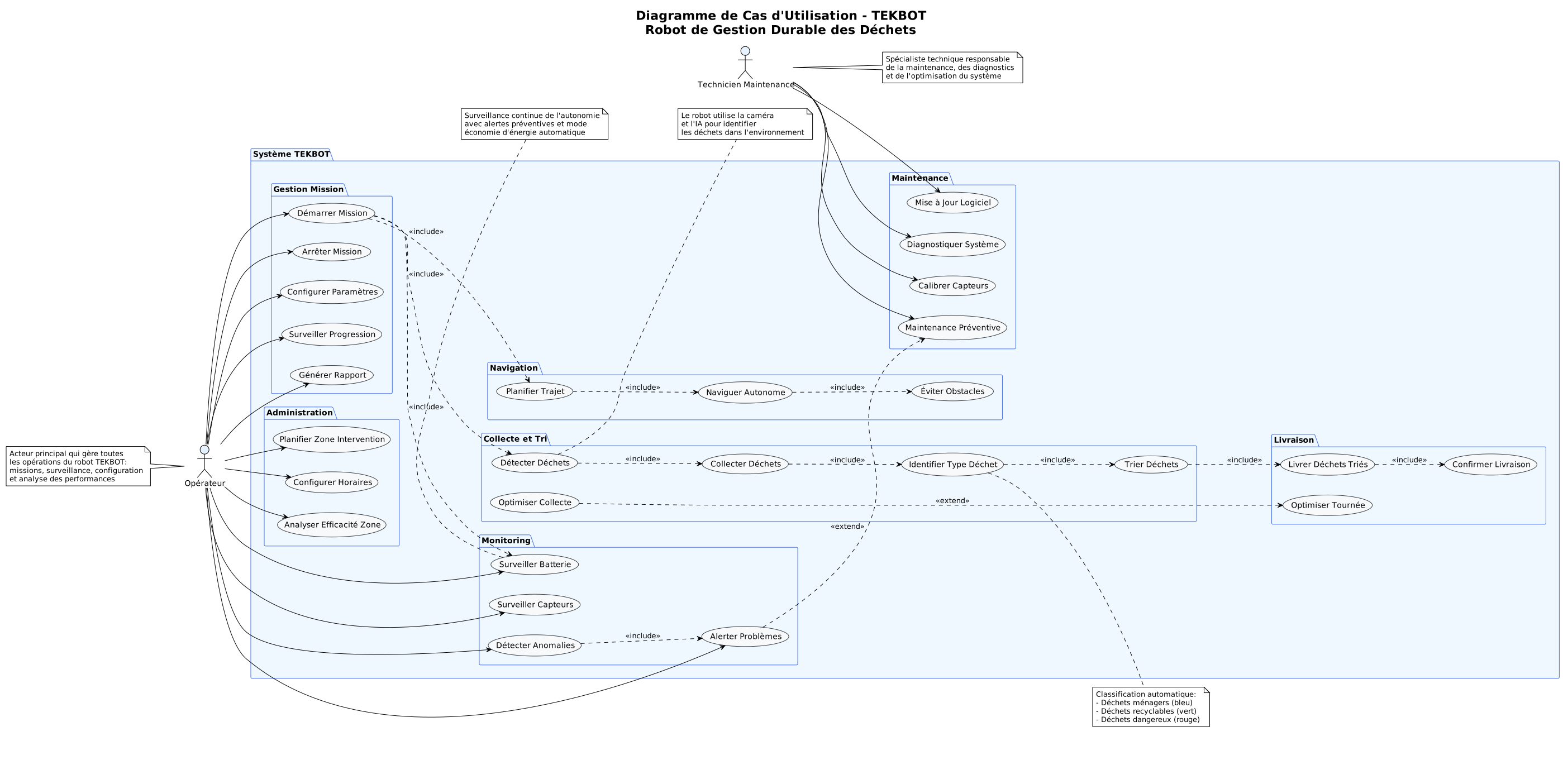
Definition: The UML use case diagram presents the different actors (users or external systems) and the main functionalities they have access to.
Objective: Identify functional needs, clarify the system scope, and facilitate communication between stakeholders.
💡 Click on the image to zoom • Use the back button or close the tab to return
Actors and use cases:
- Operator: Launch mission, monitor status, stop robot
- Technician: Configure parameters, maintenance, diagnostics
- Supervisor: Analyze performance, generate reports
- Robot (System actor): Autonomous execution of tasks
6.6 Deployment Diagram - Physical Architecture
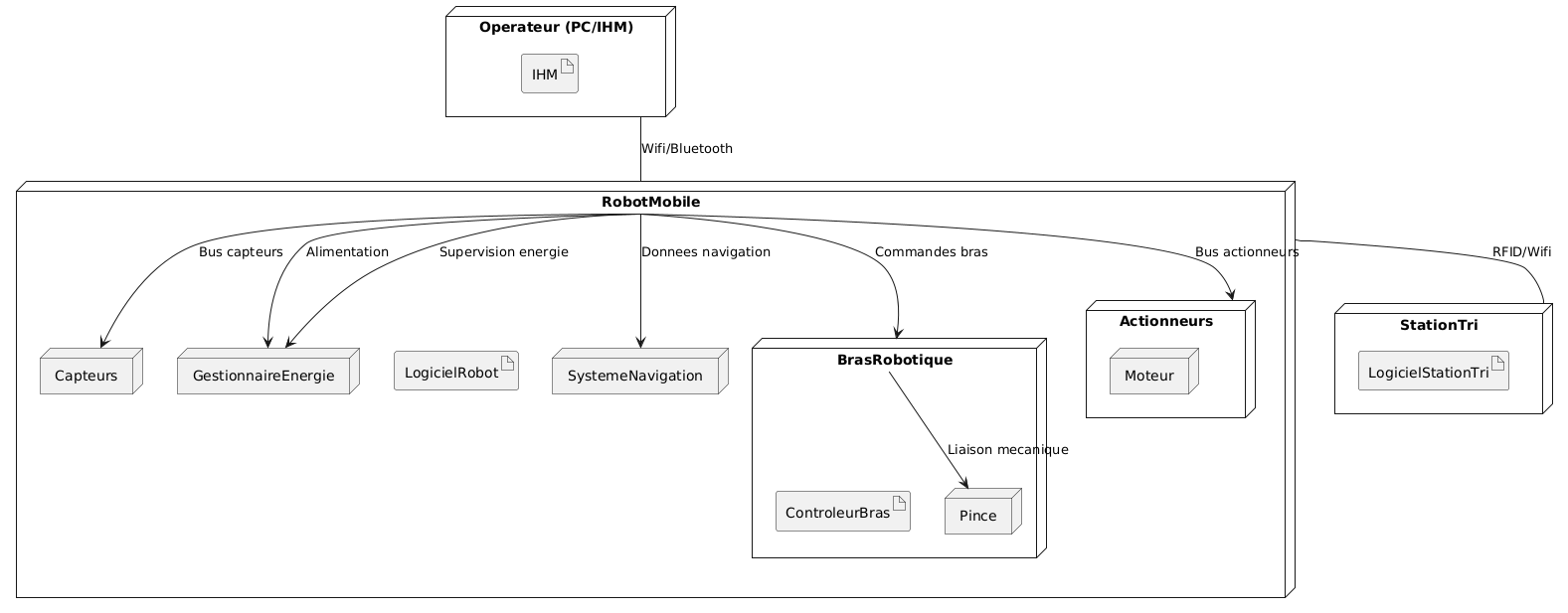
Definition: The UML deployment diagram describes the physical architecture of the system, showing how software components are deployed on the hardware infrastructure.
Objective: Visualize the geographical distribution of components, identify hardware dependencies, and facilitate deployment planning.
💡 Click on the image to zoom • Use the back button or close the tab to return
Represented elements:
- Physical nodes: Servers, computers, mobile devices, sensors
- Deployed components: Applications, databases, web services
- Connections: Networks, communication protocols, dependencies
TEKBOT Architecture:
- Central node: Raspberry Pi with main control system
- Peripheral nodes: Sensors, actuators, cameras
- Communication: I2C bus, SPI, serial interfaces
- Power: Centralized energy management
7. Detailed Justification and Strategic Role of the 19 Classes of the Project
The design of the TEKBOT project is based on a rigorous object-oriented architecture, where each class plays a precise and essential role in the robustness, modularity, and intelligence of the system.
Robot (Abstract)
Serves as the foundation for the entire architecture: it defines the essential attributes and methods (identity, energy, state, movement interface) and imposes a common contract on all robot variants. It ensures consistency, security, and the possibility of extension through inheritance, while promoting polymorphism and code factorization.
RobotMobile
Specializes the Robot class for mobility: it manages autonomous navigation, path planning, orientation, and dynamic speed management. It illustrates inheritance, method overriding, and allows integrating advanced movement algorithms (A*, obstacle avoidance, etc.).
BrasRobotique
Represents the manipulation subsystem: it encapsulates the logic of grasping, collecting, and sorting objects. Its separation allows adding or modifying manipulation capabilities without impacting the robot's core, illustrating composition and hardware extensibility.
Actionneur
Abstraction of any device performing a physical action (motor, gripper, arm, etc.). It promotes reuse, maintenance, and addition of new actuators, while ensuring a common interface for controlling hardware elements.
Moteur
Specializes the actuator for propulsion: it manages speed, rotation direction, and power. It allows isolating mechanical movement logic and optimizing the robot's energy management.
ActionSystem
Centralizes and orchestrates all actuators: it applies the facade pattern to simplify the control interface, allows coordinating multiple physical devices, and ensures consistency of the robot's actions.
PerceptionSystem
Central system for sensor management: it performs data fusion, event detection, and environment analysis. It allows easily adding new sensors and optimizing the robot's overall perception.
Camera
Specialized sensor for vision: it manages image capture, object detection, and visual analysis. It is essential for intelligent navigation and environment recognition.
Gyroscope
Orientation sensor: it measures rotations, stabilizes navigation, and allows the robot to adapt to direction or terrain changes.
Temperature
Thermal sensor: it monitors the temperature of the environment or internal components, allowing detection of overheating or anomalies, and contributes to the robot's safety.
Capteur
Abstract class for all sensors: it imposes a common interface, ensures consistency of readings, and facilitates adding new sensor types without modifying the rest of the system.
IntelligenceSystem
Decision-making brain of the robot: it analyzes data, plans missions, applies AI strategies, and makes real-time decisions to optimize the robot's behavior.
IA
Artificial intelligence module: it allows experimenting with different approaches (expert systems, learning, adaptation) and implementing advanced behaviors for the robot.
SystemeNavigation
System dedicated to path planning, obstacle avoidance, and complex movement management. It makes navigation autonomous, reliable, and optimized.
GestionnaireEnergie
Supervises consumption, recharging, and autonomy optimization: it allows the robot to adapt its behavior based on its energy level and avoid failures.
Dechet
Models each detected waste: it stores its properties (type, position, state), allows sorting, intelligent management, and traceability of wastes collected by the robot.
GestionnaireStockage
Manages storage, sorting, and capacity of collected wastes: it optimizes onboard logistics, prevents overflows, and ensures proper organization of wastes.
IHM
Human-Machine Interface: it allows user interaction, real-time visualization, and robot control, making the system accessible and controllable.
Position
Represents spatial position: it is used for navigation, detection, movement management, and graphical simulation. It forms the basis of all spatial logic in the project.
8. Code Excerpts from Main Classes
The complete code of these classes is available in the tekbot_classes/ folder of the project. Here is an overview of the base Robot class:
class Robot(ABC):
    """
    Abstract Robot class - Parent class for all robot types.

    Integrated EtatRobot enumeration according to the UML diagram.
    Uses abstraction and composition principles.
    """
    class EtatRobot(Enum):
        """
        Enumeration of possible robot states integrated into the Robot class.
        """
        ARRET = auto()
        ACTIF = auto()
        COLLECTE = auto()
        TRI = auto()
        LIVRAISON = auto()
        MAINTENANCE = auto()
        ECONOMIE_ENERGIE = auto()

    def __init__(self, nom: str):
        if not nom or not isinstance(nom, str):
            raise ValueError("The robot's name must be a non-empty string")
        self._nom = nom.strip()
        self._etat = Robot.EtatRobot.ARRET
        self._energie = 100.0
        self._mode_manuelle = False

    # === METHODS ACCORDING TO THE UML DIAGRAM ===
    def demarrer(self) -> None:
        if self._etat == Robot.EtatRobot.ARRET:
            self._etat = Robot.EtatRobot.ACTIF
        else:
            raise RuntimeError(f"Unable to start the robot - current state: {self._etat}")

    def arreter(self) -> None:
        self._etat = Robot.EtatRobot.ARRET

    @abstractmethod
    def move(self) -> None:
        pass
Complete Code
The complete source code with all getters/setters, system management, and detailed documentation is available in the project repository.
9. Visual Simulation and Getting Started
Pedagogical Objective
The TEKBOT simulation allows experimenting and visualizing the robot's behavior in an interactive virtual environment. It promotes concrete understanding of navigation, collection, and energy management algorithms.
How to Launch the Simulation
Make sure you have Python 3.11+ and Pygame installed
Open a terminal in the project folder
Launch the simulation with the following command:
bashpython main_tekbot_simulation.py
Observe the mission progression, waste collection, and energy management in real time.
Demonstration Videos
10. References and Resources
Technical Documentation
- Python 3 Documentation - Official language reference
- Pygame Documentation - Used graphics library
- PlantUML Guide - UML diagram generation tool
Pedagogical Resources
- OOP with Python - OpenClassrooms
- UML Diagrams Reference - Complete UML guide
- Real Python - OOP Guide