About the Rostmaster X3
About the Rostmaster X3
Discover two simple methods to assemble your Rosmaster X3 kit: watch our detailed assembly videos for step-by-step visual guidance, or download our ZIP guide here with a complete illustrated manual including photos for each step.
Wiring Introduction
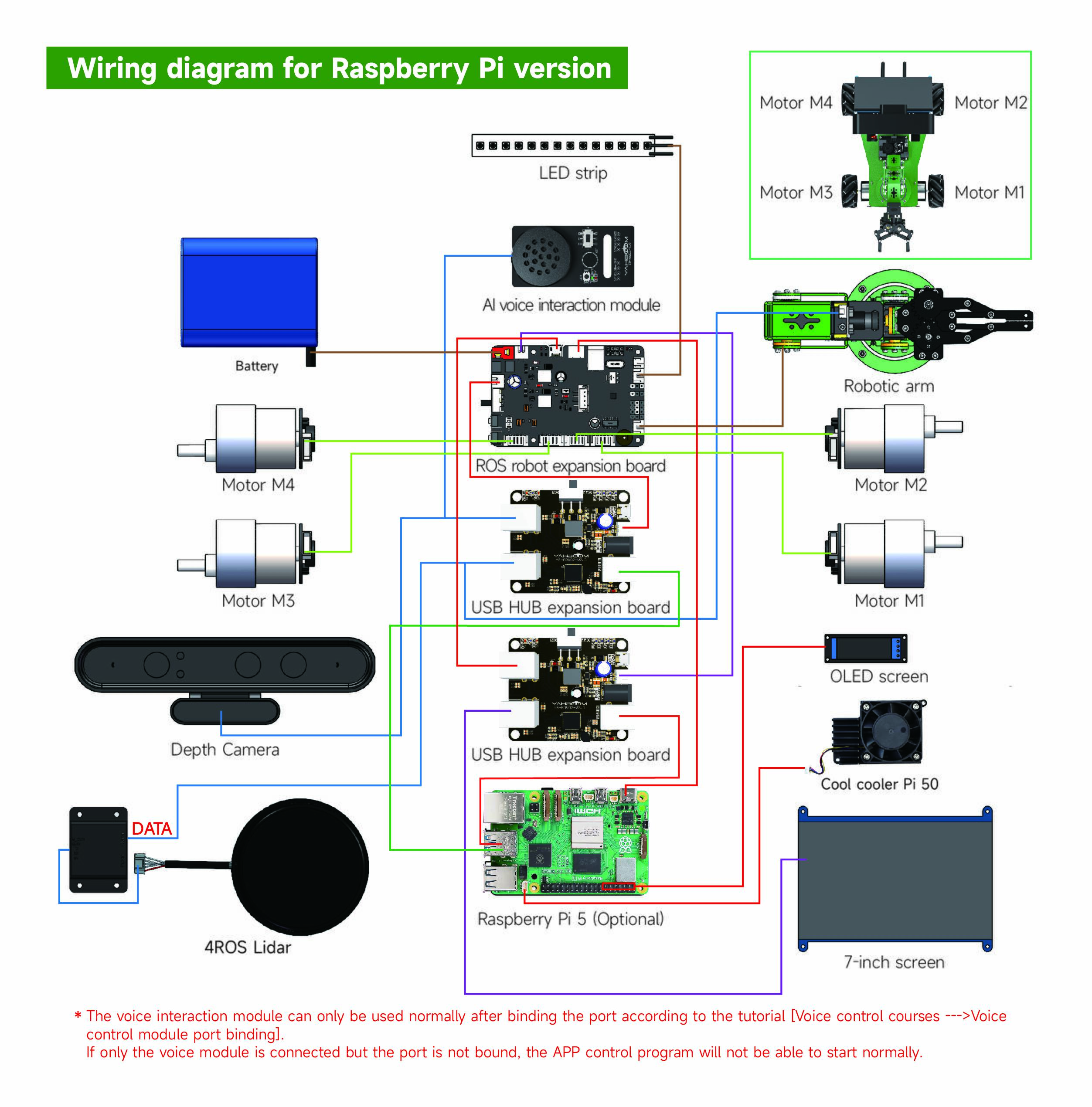
Wiring the Rostmaster X3 robot represents a critical phase of assembly, where precision is paramount to rule out any danger of short-circuit capable of permanently damaging the electronic elements. It is crucial to adopt a rigorous approach to achieve reliable and enduring performance, by ensuring that all electrical connections exactly match the required standards. By scrupulously following the provided diagrams, one eliminates common faults that would harm the robot's efficiency, thus promoting a perfect synergy between the modules for an intuitive and flawless use.
Expansion Boards and Raspberry Pi Interface Description
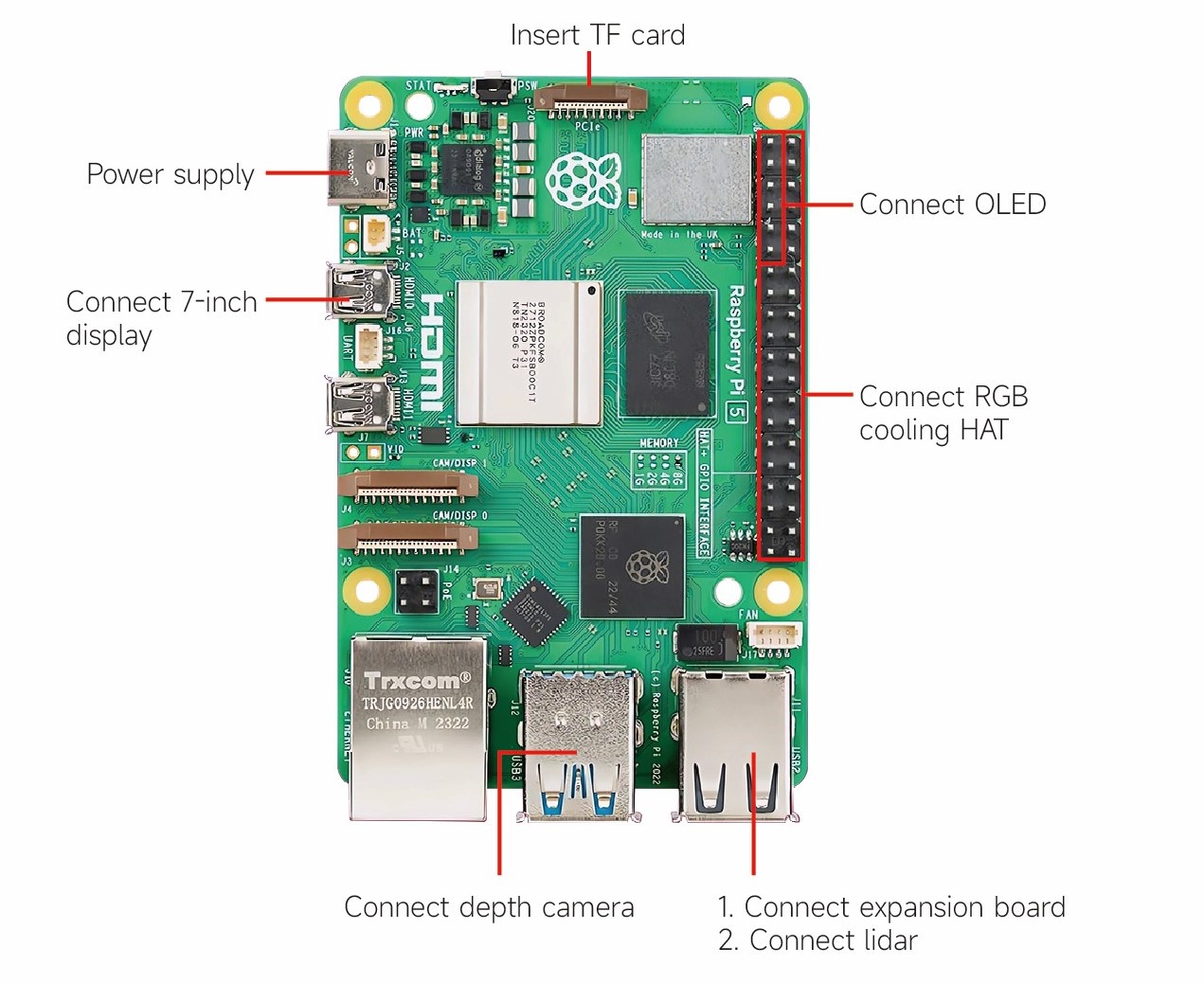
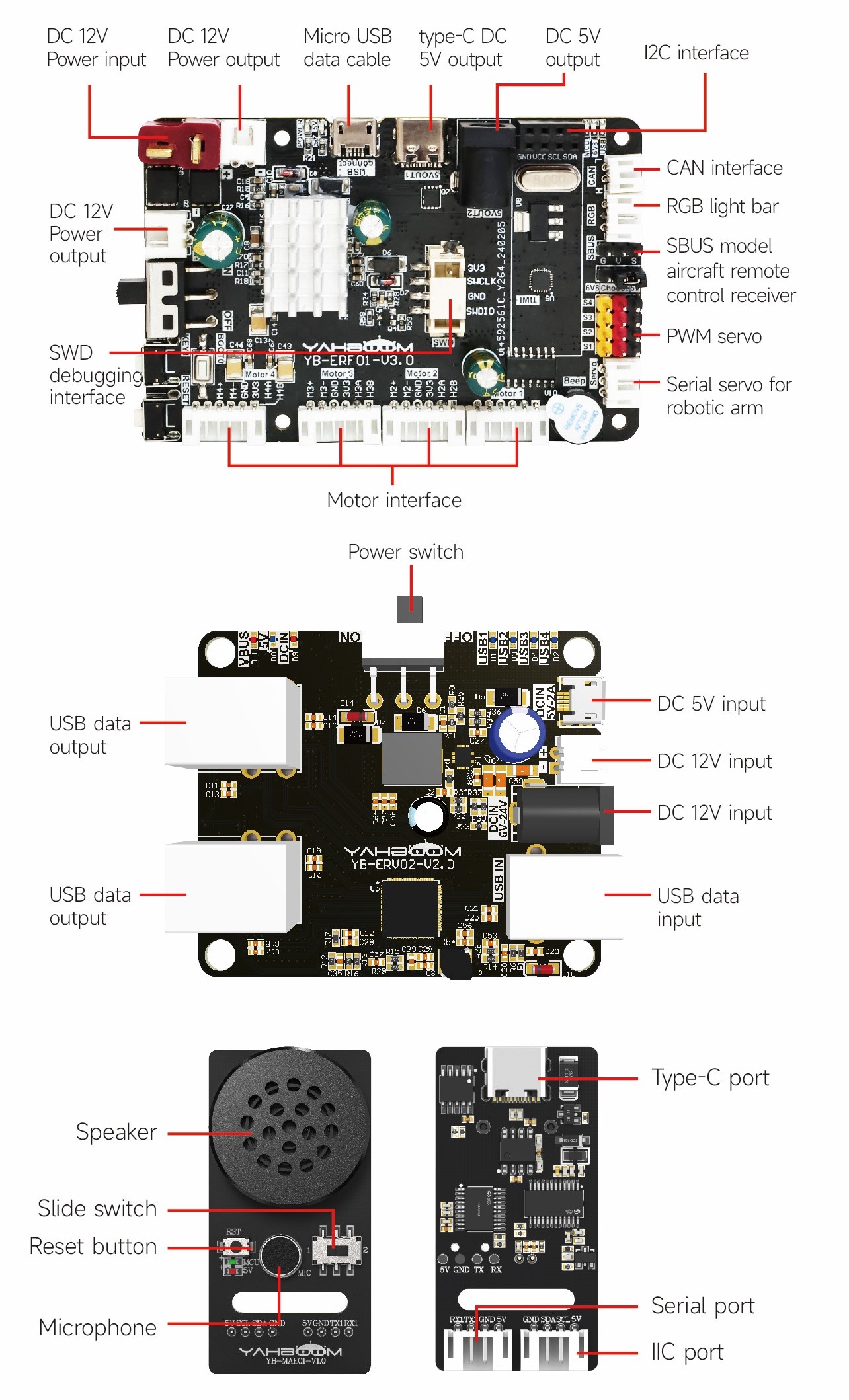
Wiring Diagram for Raspberry Pi Version
Usage Precautions
- The Rosmaster robot supports four main controllers, namely Jetson Nano development board, Jetson Orin NANO development board, Jetson Orin NX development board and Raspberry Pi 5 board.
- Jetson Nano, Jetson ORIN NANO and Jetson ORIN NX development board factory system username: jetson, password: yahboom
- Raspberry Pi 5 master control factory system username: pi, password: yahboom
- No matter which master controller, the login password of Jupyter Lab is: yahboom
- Since the Rosmaster robot will initialize the onboard nine-axis attitude sensor when it is turned on, it should be placed horizontally on the ground when it is turned on or reset by pressing the RESET button, and it can be used normally after hearing a 'beep' after about a few seconds.
- Under normal conditions, the MCU indicator of the Rosmaster robot flashes twice every three seconds. If the MCU indicator is always on or off, it means that the microcontroller on the expansion board is in an abnormal state. Please press the RESET button to reset the microcontroller.
- Before running the singleton program, please close the large program first, otherwise it may have an impact.
- After turning on the machine, the lidar will rotate automatically. Please do not block the rotation of the lidar to avoid damage to the product.
Battery and Charging
- It is strictly forbidden to access equipment that exceeds the load of the product.
- It is strictly forbidden to use batteries or chargers not provided by the company.
- When charging the battery, please turn off the main power switch on the expansion board. Do not use the battery while charging to prevent the charger or battery from exploding.
- When the battery is being charged, the indicator light of the charger will light up in red, and when fully charged, it will light up in green. After the charging is completed, the charger should be unplugged in time to avoid damage to the battery due to overcharging. Someone needs to be present when charging.
- When the battery is below 9.6V, the buzzer of the expansion board emits a 'didi di di' alarm sound, and the MCU indicator light flashes quickly. At this time, you need to turn off the power and then charge the battery.
- Turn off the main power switch on the expansion board after use. When not in use for a long time, please keep the voltage of the lithium battery pack at 11.1V~11.7V, take out the lithium battery pack and put it in the battery safety area, do not mix it with metal objects, the insulating film wrapped on the outside cannot be torn off.
- Keep away from heat, fire, any liquid, never use in damp or rain. A humid environment may cause short-circuit damage to the product.
- When the lithium battery pack or battery charger catches fire or smoke, please use sand or dry powder fire extinguisher to put out the fire, and then quickly evacuate to a safe area.
- If the lithium battery pack or battery charger is damaged, seriously heated, deformed, discolored, smelly or any other abnormal phenomenon, it should not be used, and contact us or other agents in time to deal with it.
- Please use it in an environment with a temperature of 0°C to 35°C. The stability of the lithium battery pack or battery charger may decrease at other temperatures.
- It is strictly forbidden to intentionally puncture, short-circuit, reverse connection, privately weld, impact, crush, throw lithium battery packs or battery chargers.
- It is forbidden to use the product in the environment of strong static electricity and strong magnetic field, otherwise the product will be damaged.
- It is strictly forbidden to modify or modify the hardware circuit board without permission.
- When there is no adult supervision, please do not let children use lithium battery packs or battery chargers, and store batteries in a place that children cannot reach.
- If the lithium battery pack or battery charger is smoking or hot (in severe cases, the outer casing will crack), you should quickly disconnect the main power switch, the power supply, or disconnect the main switch, and put the battery or charger in an open area.